Table of Contents
Humanoid robot programming
The first part of the subject aims to get you acquainted with programming of a humanoid robot. We will use a Python simulator of humanoid robot iCub.
Lab 1
PyBullet documentation can be useful and can be found here.
Installation
- Using venv is suggested:
python3 -m venv pycub_venv && source pycub_venv/bin/activateand then- On Linux (and possibly windows) the best way is probably to just do:
python3 -m pip install icub_pybullet - Alternatively,
git clone https://github.com/rustlluk/pyCub.git,cd pyCub/icub_pybulletandpython3 -m pip install .- In theory, you do not need to install it. All HWs should work without installation, if you run then from the correct folder. You need to install dependencies by hand, though
- MACs with ARM procesors may have problems with installing open3d. You can either:
- Use conda which should have the correct binaries compiled
- Install open3d from source. Check https://github.com/rustlluk/pyCub/blob/master/Docker/Dockerfile and https://www.open3d.org/docs/release/arm.html
- Use VNC DockerVNC Docker
- Use Gitpod (ONA). Use gitpod. Open https://app.gitpod.io/#https://github.com/rustlluk/pycub (you will need github account). The first run can take some time, but after that you should see an environment inside a virtualized system. The performance is not great, but if you change simulation speed (in client.update_simulation(time)) it is fine. t = 0.025 seems to work okay. The code is already downloaded and installed in /home/gitpod/pycub
- you will be asked to select web interface or to open using plugins to vscode or PyCharm
- Use lab computers
python3 -m pip install –upgrade pip and python3 -m pip install -U –trusted-host www.open3d.org -f http://www.open3d.org/docs/latest/getting_started.html open3d before running pip install. Copying from this tends to change two dashes (-) after each other as a long dash, update it in the terminal then.
More info can be found on Github or this presentation.
python3 -m icub_pybullet.examples.push_the_ball_cartesian and you should see robot hitting a ball from a table.
Lab Computers
The computers in the lab should be powerful enough to run the code. You can install the same way (create venv, install icub_pybullet from pip).
Running bugs solutions
- Use Python 3.8-3.12
- if you are using conda (or similar) install the packages using 'conda install …' and not 'python -m pip install …'. These two are not the even though it may look like it
- if you use IDE (pycharm, vscode) try to run it also in normal terminal outside the IDE. IDEs sometimes replace system variables which can cause problems with graphical things
- use open3D web visualizer. Set gui.web in config to True (and gui.standard to False)
iCub Kinematics
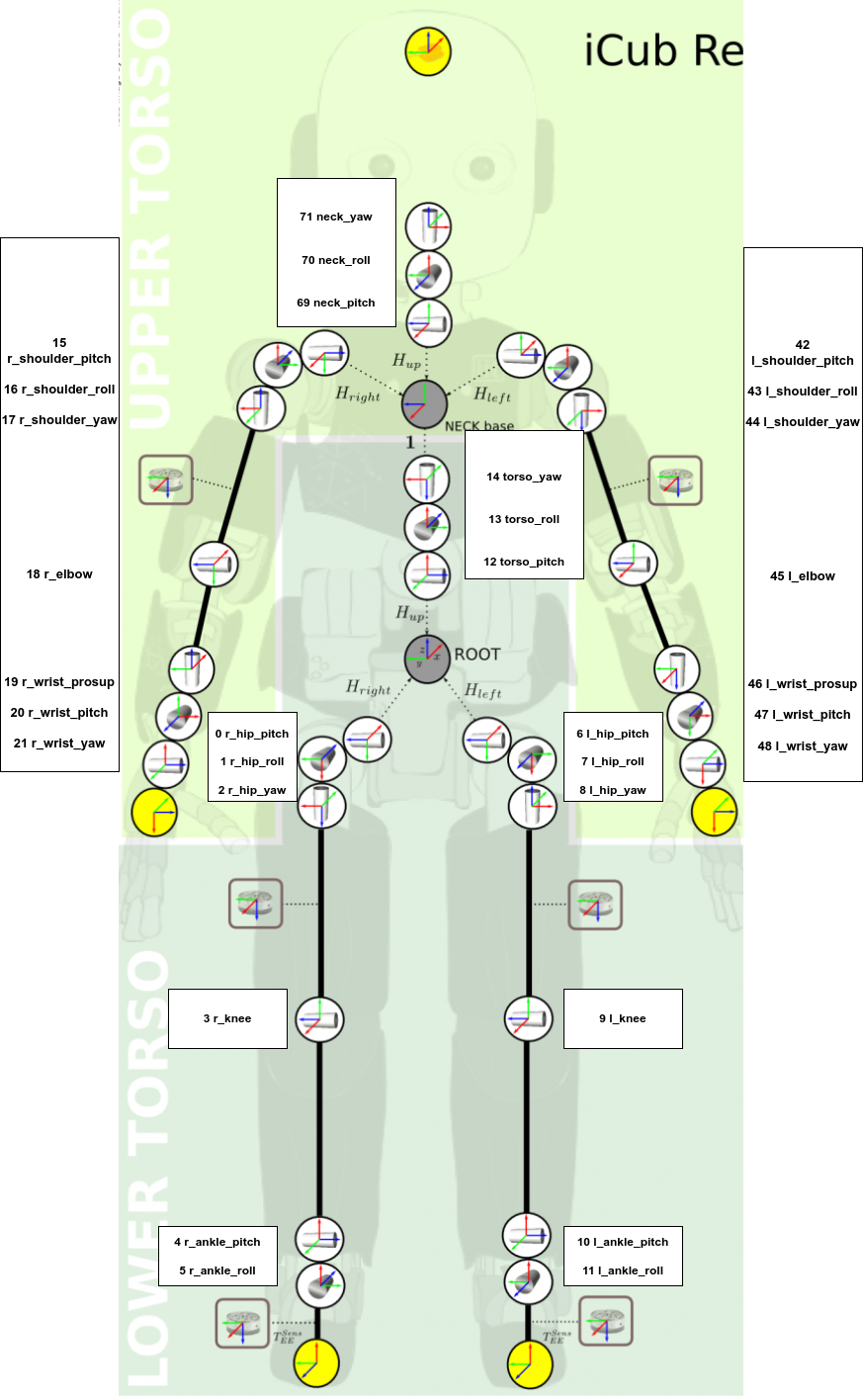
This picture shows the joints of iCub with their names and indexes that can be used to control the robot in joint space in the PyCub simulator.
PyCub
The simulator is written in Python3 and uses PyBullet as a physics engine and Open3D for visualization. It should run without problem on any system with Python3 (it is tested in Python3.11; anything over 3.8 should be fine; the theoretical lower limit is 3.6 because of f-strings and upper limit 3.12 because some dependencies).
The whole documentation can be found here.
A presentation with a description of basic functionality can be found here.
Lab 2
This lab is focused on precise movements. You can use This template to play together with the lab tutor and later implement the function move(args) to test your solution in the test environment.
The goal of function move() is to perform line and circle movements. Th function have to return start and end pose of the trajectory (type icub_pybullet.utils.Pose; can be obtained by pycub.end_effector.get_position())
Evaluation
- both circle and line movements will be evaluated with three sub-criteria:
- circle:
- standard deviation of each point of the circle to center; must be < r*0.125
- difference between expected and real radius; must be < r*0.1
- mean distance of all points from the expected plane; must be < 0.1
- line:
- difference from real length to expected length; must be < 0.0075
- angle between the expected and real line; must be <0.1
- mean distance of all points from the expected line; must be < 0.01
- points will be awarded if all the sub-criteria are met
- BRUTE also shows image of your trajectory (black) vs expected trajectory (blue). It may not be always 100% correct.
Possible inputs
- action: string, either “line” or “circle”
- axis: list of ints. For “circle” it the length is always 1. For “line” the length can be from 1-3. Individual numbers on the list are axes along which the robot should move. For example, [0, 1] means that the robot should move in x- and y-axis.
- r: list of floats. The same length as axis. Number in metres. For “circle” it is the radius of the circle. For “line” it is the length of the line in the given axis.
- Examples:
- action=“circle”, axis=[0], r=[0.01] - the end-effector should move in a circle around the x-axis with a radius of 0.01m
- action=“line”, axis=[1], r=[-0.05] - the end-effector should follow a line in the y-axis with a distance of -0.05m
- action=“line”, axis=[0, 1], r=[0.05, -0.05] - the end-effector should follow a line in the x-axis for 0.05cm and y-axis for -0.05m
- it should be simultaneous movement in both axes, i.e., it will be one line
- The movements can be anywhere in space. E.g., when you should do a circle around X-axis, it can be anywhere in the space around an axis that is parallel to the world X-axis
Lab 3
Resolved-Rate Motion Control (RRMC) The goal of this lab is to use the skin of the robot to detect collision and utilize RRMC to move away from the collision. Please, use the attached template to complete the task.
The template contains a few lines of code, but you do not have to use them; they are there just for your convenience and to guide you towards the solution.
The task is to detect the biggest cluster of activated skin points and then move the body part that contains the activated skin part away from the collision (away means against the normal of the contact) using RRMC. See the video below.
Try to play with both Jacobian inverse and transpose. Reason about the following questions:
- Which approach worked better? Why do you think it is like that?